At Novel Solutions we provide Remote Computer Support
using CrossLoop, a product that simplifies the process of securely working over
the Internet. Explicit permission is required before any screen images are sent
to a Remote PC. All information communicated is encrypted using a 128-bit
encryption algorithm to ensure only the authorized user can view your screen
and manipulate your PC controls (i.e. mouse and keyboard). This
product is designed to do all the work for you, no changes
are required on your Router or the Internet Security settings. Just follow
these instructions and it'll be up and running in no time.
1. Start the download by Clicking Download.

2. When prompted Click Run in each of the two windows that appear.
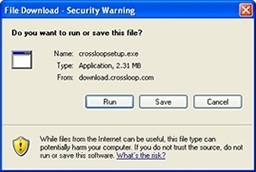
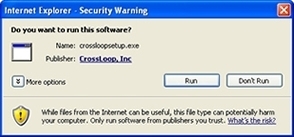
3. Install CrossLoop with the default
program options.
4. Now just run CrossLoop, Click the Host tab, finally Click
Connect. If you're using a software Firewall (i.e.
Windows Firewall, ZoneAlarm, etc.) a window will popup warning TightVNC
is attempting to use the Internet, allow or unblock this.
Note if you have an option to remember this in the future
please select it.